パッケージの設定とメタデータにはpyproject.tomlファイルを使用します。#
pyproject.toml の要点
インストール可能なPythonパッケージに必要なテーブルは2つだけです: [build-system] と [project] です。 [project] テーブルにはパッケージのメタデータが格納されます。
[project] テーブルには2つの 必須 フィールドがあります:name= と version= です。
ユーザーが PyPI であなたのプロジェクトを見つけやすくするために、
pyproject.tomlファイルの classifiers セクションにメタデータを追加します。[project] テーブルに分類を追加するときは、 PyPIの分類ページ にある有効な値のみを使用してください。 ここで無効な値を指定すると、パッケージをビルドするときやPyPIに公開するときにエラーが発生します。
There is no specific order for tables in the
pyproject.tomlfile. However, fields need to be placed within the correct table sections. For examplerequires =always needs to be associated with the [build-system] table.
pyproject.tomlファイルについて#
すべてのモダンな Python パッケージには pyproject.toml ファイルを含めるべきです。純粋な Python パッケージでは、このファイルはプロジェクトのメタデータを記述するために setup.py や setup.cfg ファイルを置き換えます。
プロジェクトが純粋な Python でない場合、Python 以外の拡張機能をビルドするために setup.py ファイルが必要になるかもしれません。しかし、プロジェクトのメタデータを保存するためには引き続き pyproject.toml ファイルを使用すべきです。
チュートリアル
setup.py または setup.cfg ファイルから移行しており、サポートが必要な場合は、このチュートリアルを確認してください。 ビルド要件を指定し、メタデータは pyproject.toml と呼ばれます
.toml フォーマットについて#
pyproject.toml ファイルは TOML(Tom's Obvious, Minimal Language)フォーマット で書かれています。TOML はキーと値のペアに基づく読みやすい構造です。pyproject.toml ファイルの各セクションには [テーブル識別子] が含まれています。そのテーブル識別子の下には、そのテーブルの設定をサポートするキーと値のペアがあります。
[build-system]以下はtoml言語ではテーブルとみなされます。build-systemテーブルの中で、requires =はキーです。requiresに関連する値は、値"hatchling"を含む配列です。
[build-system]
requires = ["hatchling"]
パッケージのビルド時にpyproject.tomlがどのように使用されるか#
PyPIに公開すると、各パッケージにメタデータがリストされていることに気づくでしょう。pyOpenSciパッケージ の一つである xclim を見てみましょう。PyPIのランディングページには、pythonやメンテナ情報など、パッケージに関するメタデータが表示されていることに注目してください。PyPIは、Xclimのメンテナ pyproject.toml file によって正しい構文と分類子を用いて定義されたメタデータを入力することができます。xclimパッケージがビルドされるとき、このメタデータは配布ファイルに変換され、PyPIがメタデータを読み込んでウェブサイトに出力できるようになります。
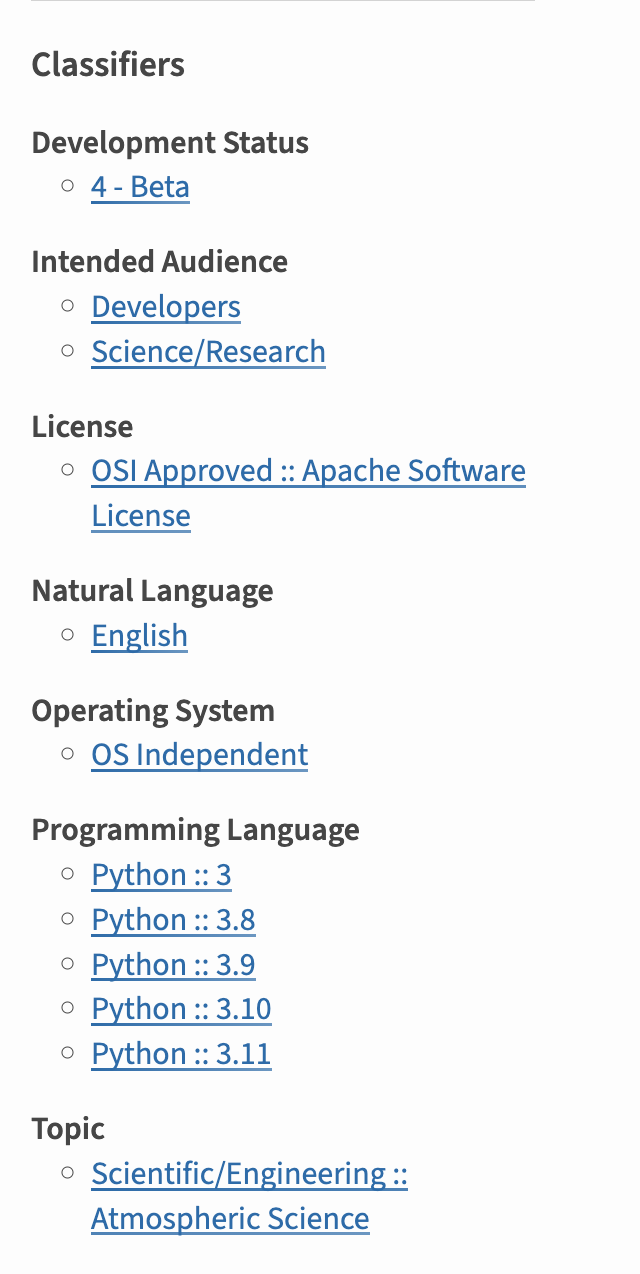
pyproject.tomlにclassifierセクションを追加してパッケージがビルドされると、ビルドツールはメタデータをPyPIが理解できる形式に整理し、PyPIのランディングページに表示します。 これらの分類子により、ユーザはサポートするpythonのバージョンやカテゴリなどでパッケージをソートすることもできます。#
pyproject.tomlファイルを使用する利点#
パッケージのメタデータを人間が読める pyproject.toml 形式で含めると、GitHubのリポジトリでプロジェクトのメタデータを見ることができます。
Setup.py は、複雑なパッケージのビルドに便利です。
パッケージのビルドとメタデータを管理するために setup.py を使うことは パッケージ開発に問題を引き起こす可能性があります 。 Python パッケージのビルドが複雑な場合、setup.py ファイルが必要になるかもしれません。 このガイドでは複雑なビルドは扱いませんが、将来的には複雑なビルドを扱うリソースを提供する予定です。
pyproject.toml ファイルのオプションフィールドと必須フィールド#
pyproject.toml ファイルを作成するとき、使用できるメタデータフィールドがたくさんあります。 以下では、PyPI での公開とユーザがあなたのパッケージを見つけることをサポートする、特定のフィールドを提案します。
プロジェクトの全メタデータ要素の概要は、こちらをご覧ください。
[project] テーブルの必須フィールド#
上述したように、 pyproject.toml ファイルはパッケージを適切にビルドするために name と version フィールドを持つ必要があります:
name: プロジェクトの名前を文字列で指定します。version: プロジェクトのバージョンです。 バージョン管理に SCM ツール (git タグを使用してバージョンを決定する) を使用している場合は、このバージョンは動的なものになります (詳細は後述します)。
[project] テーブルに含めるオプションフィールド#
以下のメタデータキーも追加することを強くお勧めします。 これらのフィールドを追加することで、あなたのパッケージがどのような構造になっているのか、どのプラットフォームをサポートしているのか、どのような依存関係が必要なのかを明確にすることができます。
Description: これはあなたのパッケージの短い一行説明です。
Readme: 長い長い説明には README.md ファイルへのリンクが使われます。 この情報はあなたのパッケージのPyPIランディングページで公開されます。
Requires-python (pipで使用): これはpipが使用するフィールドです。 ここでは、Python 2.xと3.xのどちらを使っているかをインストーラに伝えます。 ほとんどのプロジェクトは3.xを使うでしょう。
ライセンス: 使用しているライセンス
Authors: パッケージの原作者です。 作者がメンテナと異なることもあります。 また、同じ場合もあります。
Maintainers: これを入力するかどうかを選択できます。 各作者やメンテナーの名前、Eメール、メールアドレスなどのサブ要素を持つリストを使って、この情報を入力することができます。
authors = [
    {name = "Some Maintainer", email = "some-email@pyopensci.org"},
]
project.dependency: すべてのパッケージが依存関係を必要とするわけではないため、依存関係グループはオプションです。ただし、プロジェクトに特定の依存関係がある場合は、このセクションを
pyproject.tomlに含めてください。 pyproject.toml ファイルで宣言された依存関係は、プロジェクトのインストール時に uv または pip によってインストールされます。project.optional-dependencies: 誰かが
python -m pip install projectname[feature]を実行すると、オプションまたは機能の依存関係がインストールされます。ユーザーがuv syncやpython -m pip install packagenameを実行したときにはデフォルトでインストールされない、パッケージに特定の機能を追加する依存関係を宣言するためにこの配列を使います。dependency-groups: 依存関係グループは、寄稿者または開発者がパッケージで作業する必要があるパッケージとツールを整理します。これらの依存関係には、テスト、リンター、コード フォーマッタを構築および実行するためのツールが含まれる場合があります。これはオプションですが、依存関係を整理してインストールするために強く推奨される方法です。このセクションは、requirements.txt ファイルを置き換えることができます。 これらをパッケージに追加する方法については、こちらの PyPA ガイドをご覧ください。
keywords: これらはPyPIのランディングページに表示されるキーワードです。 人々があなたのパッケージを検索するときに使う言葉だと考えてください。
classifiers: メタデータの classifiers セクションは、PyPI でのパッケージのランディングページや、PyPI でのパッケージのフィルタリングにも重要です。classifiers のすべてのオプションはこちらで確認できます。含めることを検討すべき classifiers には次のようなものがあります
開発状況
対象読者
トピック
プログラミング言語
pyproject.tomlファイルの高度なオプション#
[project.scripts](Entry points): エントリーポイントは任意です。 パッケージでホストされている特定のスクリプトを実行するコマンドラインツールがある場合、そのスクリプトを(Pythonシェルではなく)コマンドラインで直接呼び出すためのエントリポイントを含めることができます 。以下は、エントリーポイントスクリプトを持つパッケージ の例である。 そのパッケージには、一連のタスクを実行するいくつかのコアスクリプトが定義されていることに注目してほしい。 pyOpenSciはこれらのスクリプトを使ってメタデータを処理しています。
フィールドが動的に設定される場合は ダイナミックフィールド を使用します。たとえば、Git タグを使ってパッケージのバージョンを自動的に更新したい場合(SCM/バージョン管理ベースのバージョニング)などです。例:dynamic = ["version"]
pyproject.tomlファイルに依存関係を追加#
Required dependencies#
A requirements.txt file has been traditionally used to specify dependencies, but modern practice puts these
in the pyproject.toml file. Required dependencies are specified under the [project] section as a list of strings:
[project]
...
...
...

dependencies = [
    "dependency-package-name-1",
    "dependency-package-name-2",
    "pandas",
    "xarray",
    "geopandas",
    "matplotlib"
]
Optional dependencies#
Optional dependencies are specified under the [project.optional-dependencies] section and are intended to give users
options for including additional dependencies with their installation. Optional dependencies are collected together
as a list of strings and assigned to a name:
[project.optional-dependencies]
plot = ["bokeh"]
test = ["pytest", "pytest-cov"]
docs = ["sphinx", "pydata-sphinx-theme"]
Named dependency lists can be invoked by users on installation to include those specific dependencies on installation. Here is an example installing the test and docs dependencies using pip:
python -m pip install examplePy[test,docs]
Other installation tools tend to follow a similar pattern where optional dependencies are concatenated as a list to the package name.
Dependency Groups#
Dependency groups are a way to group package requirements in the pyproject.toml file but exclude them in the
project metadata when it is built. Because it is not included in the project metadadata, users will not be able to
invoke dependency groups when installing from a package index such as PyPI, but they can be accessed by developers
who have all the project data (e.g. through cloning a repository). Optional dependencies are intended for package
consumers and dependency groups are intended for package maintainers and contributors.
To add development dependencies to your build, add a [dependency-groups] array to your pyproject.toml file.
Then specify dependency groups as follows:
[dependency-groups]
test = [
    "pytest",
    "pytest-cov"
]

lint = [
    "black",
    "flake8",
    "ruff"
]

docs = [
    "sphinx",
    "pydata-sphinx-theme"
]
One of the capabilities that dependency groups have is the ability to make composition groups.
For example, dev dependency group could be composed of a test dependency group and a lint dependency group:
[dependency-groups]
...
...
...

dev = [
    {include-group = "test"},
    {include-group = "lint"}
]
To access groups using pip (requires pip 25.1 or higher), you can invoke them during installation like this:
python -m pip install --group dev
再帰的依存関係
再帰的依存関係のセットをセットアップすることもできます。 詳しくはこのブログ記事を参照。
hatchlingを使用してビルドするpyproject.tomlの例#
以下は Python プロジェクトのビルド設定の例です。 このパッケージの設定例では、 パッケージの sdist と wheel をビルドするのに hatchling を使っています。
# pyproject.toml example build setup to use hatchling and hatch_vcs
[build-system]
requires = ["hatchling"]
build-backend = "hatchling.build"

[project]
name = "examplePy"
authors = [
    {name = "Some Maintainer", email = "some-email@pyopensci.org"},
]
maintainers = [
    {name = "All the contributors"},
]
description = "An example Python package used to support Python packaging tutorials"
keywords = ["pyOpenSci", "python packaging"]
readme = "README.md"
license = "BSD-3-Clause"
classifiers = [
    # How mature is this project? Common values are
    "Development Status :: 4 - Beta",

    # Indicate who your project is intended for
    "Intended Audience :: Developers",
    "Topic :: Software Development :: Build Tools",
    "Programming Language :: Python :: 3 :: Only",
    "Programming Language :: Python :: 3.10",
    "Programming Language :: Python :: 3.11",
]
dependencies = [
    "dependency-package-name-1",
    "dependency-package-name-2",
    "pandas",
    "xarray",
    "geopandas",
    "matplotlib"
]

[dependency-groups]
test = [
    "pytest",
    "pytest-cov"
]

lint = [
    "black",
    "flake8",
    "ruff"
]

docs = [
    "sphinx",
    "pydata-sphinx-theme"
]

dev = [
    {include-group = "test"},
    {include-group = "lint"}
]
このファイルには依存関係が指定されています。
setuptoolsを使ってビルドするpyproject.tomlの例#
作者やキーワードなどを含むパッケージのメタデータも読みやすいです。 下の図は、異なるビルドシステム(setuptools)を使った同じTOMLファイルです。 このパッケージのビルドに必要なツールを入れ替えるのがいかに簡単かに注目してください!
このパッケージのセットアップ例では:
パッケージのsdistとwheel をビルドするための setuptools 。
setuptools_scm は、バージョン管理タグを使ってパッケージのバージョン更新を管理します。
以下の例では、[build-system] が最初の値のテーブルです。 このテーブルには2つのキーがあり、ビルドバックエンドAPIとそれを含むパッケージを指定します:
requires =build-back-end =
[project]
name = "examplePy"
authors = [
    {name = "Some Maintainer", email = "some-email@pyopensci.org"},
]
maintainers = [
    {name = "All the contributors"},
]
description = "A setuptools example Python package used to support Python packaging tutorials"
keywords = ["pyOpenSci", "python packaging"]
readme = "README.md"
license = "BSD-3-Clause"
classifiers = [
    "Programming Language :: Python :: 3",
    "Operating System :: OS Independent",
    "Intended Audience :: Science/Research",
]
dependencies = []
dynamic = [
    "version",
]


[build-system]
requires = [
    "setuptools>=80",
    "setuptools-scm",
    "wheel",
]
build-backend = "setuptools.build_meta"


[tool.setuptools]
# Allow the package to be used directly from a zip archive.
zip-safe = true

# Do not automatically include non-Python package data in the wheel.
include-package-data = false

[tool.setuptools_scm]
write_to = "src/examplePy/_version.py"
version_scheme = "release-branch-semver"


[project.optional-dependencies]

test = [
    "pytest",
    "numpy",
    "pandas",
    "ruff",
]

contrib = [
    "pre-commit>=4.1.0",
]